Loading...

Your privacy choices

Google Analytics 4 measures site visits and Google Ads measures advertising clicks and checkout completions, only for the purposes you accept. Neither is required to buy. Necessary checkout services remain available.

Your privacy choices

Google Analytics 4 measures site visits and Google Ads measures advertising clicks and checkout completions, only for the purposes you accept. Neither is required to buy. Necessary checkout services remain available.

These optional Google services may set audience or advertising cookies after your acceptance. Analytics and advertising are separate choices. Acceptance and refusal are remembered in this browser for a fixed 180 days, without extending the period when read. You can withdraw or change your choices at any time using Privacy choices in the footer. Withdrawal removes optional first-party Google cookies and reloads the page if Google has already loaded (using session storage in this tab if persistent storage refuses the withdrawal; a blank page opens only if both stores cannot safely record the withdrawal and a stale approval remains). Checkout, external demos, videos, support and newsletter services have their own privacy information.

Quotes & payments for WordPress

Build WordPress quote forms and calculators with AI.

Describe your form, request changes and generate pricing formulas in plain language. Fine-tune everything visually, then let customers get an estimate and pay online.

Explore all AI tools

$74.25/year · 1 site · USD, before tax.

14-Day Money-Back GuaranteeSecure Payment
4.9/5504 archived CodeCanyon reviews
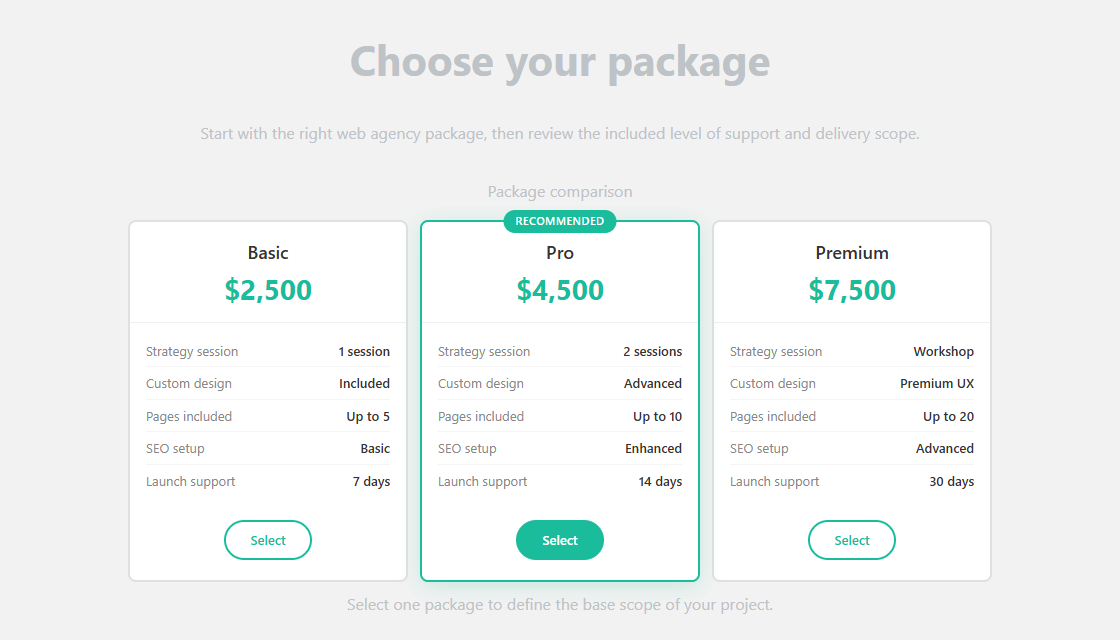
Demo: web agency quote form
Web agency quote form comparing Basic, Pro and Premium service packages
Options → estimate → requestTry a live demo

Your instructions. Your form.

Create it. Refine it. Let AI help with the maths.

Go from a description to a WordPress quote form, adjust an existing flow, or turn a pricing rule into a calculation. Keep control in the visual editor.

Explore all AI tools
01

Create a form with AI

Describe your services, steps and prices. Generate a form structure, then refine it in the visual builder.

Example instructionCreate a painting quote form with surface area, paint finish, optional ceiling painting and contact details.
Explore AI form creation
02

Edit an existing form with AI

Ask for a specific change to your form. Review the proposed changes and choose which ones to apply.

Example instructionAdd a premium paint option at €8 per m². Keep the existing contact fields and steps.
Follow the AI editing guide
03

Generate pricing formulas with AI

Explain your pricing rule in plain language. Use the calculation editor’s AI tool, then check the formula with known totals.

Example instructionCharge €35 per m². Above 100 m², apply a 10% discount to the whole painting subtotal.
See the AI calculation guide

AI tools are included in Pro and Agency. Connect your own provider API key; provider usage is billed separately. Review the generated structure and calculations before publishing.

Compare Pro and Agency

Live demos

Try the experience your customers will get.

Change the options, see the estimate and explore the next steps. No installation required.

See all 8 demos
Agency Quote CalculatorOpen full demo

Preview not displaying? Open full demo ↗

Build my form with Pro

$74.25/year · 1 site · USD, before tax.

14-Day Money-Back Guarantee

From your pricing to your website

Your first form, in three steps.

Open the setup guide
  1. 01

    Create your form

    Add visual choices and questions in the builder. Start manually or use optional AI to draft your form.

  2. 02

    Set your prices

    Define your options, formulas and conditions. Check the calculated totals against your own rates.

  3. 03

    Publish on WordPress

    Add the shortcode to your page. Test the complete flow, then start receiving requests.

From the CodeCanyon archive

From the CodeCanyon review archive

Customers describe their experience with flexibility, support and complex calculators in these archived CodeCanyon reviews.

Read the archived reviews

Flexible enough for advanced quoting flows

“5 stars for design, 5 stars for code quality, 5 stars for flexibility. Awesome plugin. Im really impressed.”
IT-BueroVerified customer

Support that keeps projects moving

“Amazing script amazing support always happy to help it's members definitely recommend this seller. Keep up great work.”
oOSpikeOoVerified customer

Handles complex calculators reliably

“Absolutely amazing plugin! I've created a massive calculator based on dozens of parameters and it hasn't missed a beat. Love the UI and the customer support is second to none”
tinnudVerified customer

For freelancers & small businesses

One plugin. Your complete quote flow.

Build an estimate that fits your business, collect the request and offer payment when you need it.

  • Live estimates with your pricing rules
  • Guided quote requests and conditional questions
  • Optional payments and deposits
  • PDF summaries and email follow-up
Explore every feature
Pro

$74.25/year · 1 site · USD, before tax.

$74.25/year on every renewal. Keep your 25% discount while your subscription stays active. Cancel anytime. AUTUMN26 applied automatically at checkout.

Buy Pro
14-Day Money-Back GuaranteeSecure Payment

No plugin fees per submission or transaction. Payment provider fees apply. AI is optional, uses your API key and is billed separately by its provider.

Full plan details

Before you buy

A few things worth knowing.

Try the demo, review the details, then build your own form with Pro.

Buy Pro

14-Day Money-Back Guarantee

Can I try it before buying?

Explore the live demos, screenshots and documentation without installing anything. There is no free version or free trial. Pro includes a 14-day money-back guarantee.

What does Pro include?

One website, unlimited forms, conditional logic and calculations, payment integrations, PDFs and support. The license is billed annually.

Are there any additional costs?

There are no plugin fees per submission or transaction. Payment providers charge their own processing fees. Optional AI uses your own OpenAI or Anthropic API key; provider usage costs are separate.

Do I need AI or WooCommerce?

No. You can build forms visually without AI. WooCommerce is optional; direct payment integrations are also available when you want to collect a payment or deposit.