Google Analytics 4 measures site visits and Google Ads measures advertising clicks and checkout completions, only for the purposes you accept. Neither is required to buy. Necessary checkout services remain available.
AI tools
Build WordPress quote forms and cost calculators with AI
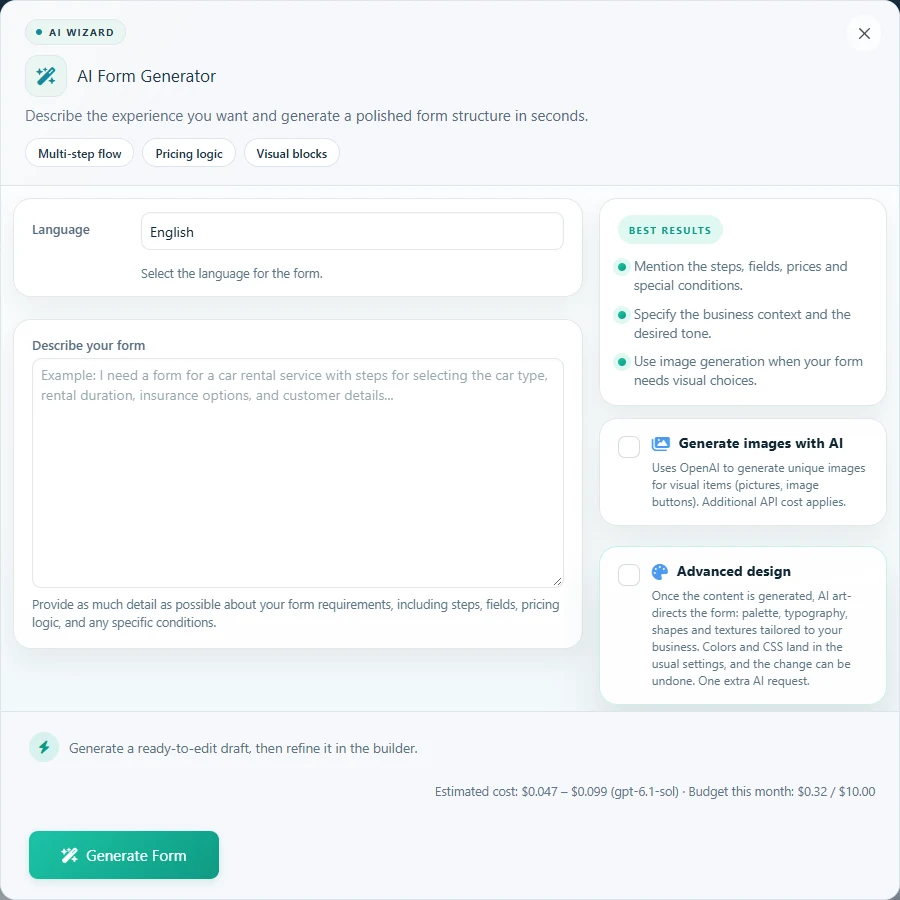
Describe your services and pricing to generate a multi-step form. Ask AI to refine an existing form or draft a calculation, then review and adjust the result in WP Cost Estimation’s visual editor.
In A.I Wizard, specify the language, steps, required fields, prices and conditions. Review the generated structure and refine it before creating the form. The saved form remains editable with the normal builder.
Give your own rates and one expected total.
Review fields, steps and conditional branches.
Test the published form’s full visitor journey.
Write, translate and guide
Also available: labels and descriptions, form translation, email content, and an optional assistant to help visitors complete a form.
Review text changes before applying them.
Configure the visitor assistant separately for each form.
Your API key, your visual editor
AI tools are included in Pro and Agency. Connect your own provider API key; provider usage is billed separately. Review the generated structure and calculations before publishing.
Buyer questions
Frequently asked questions
Can AI create a complete multi-step form?
Yes. The wizard can generate steps, fields, pricing and conditional links from a description. Review its proposal, adjust the prices to your business and test the form before publishing. Payment credentials and external integrations still need your configuration.
Can I edit a form I already built?
Yes. Use Edit this form with AI on the forms list, describe the change and review the proposed changes. Select the changes you want to apply, then check the saved form in the visual editor.
Do I need my own API key?
Yes. Configure your provider in the plugin’s AI Settings. OpenAI and Anthropic are supported for text-based AI tools. API usage is billed by your provider separately from the plugin license. Optional image generation uses OpenAI.
Can I keep building forms without AI?
Yes. AI is optional. The visual builder, calculation editor and normal form workflow remain available without an AI connection.
Recommended next steps
Review the demos, compare the pricing section, and use the documentation to verify the exact workflow before building a complex calculator.