
Loading...

Your privacy choices

Google Analytics 4 measures site visits and Google Ads measures advertising clicks and checkout completions, only for the purposes you accept. Neither is required to buy. Necessary checkout services remain available.

Your privacy choices

Google Analytics 4 measures site visits and Google Ads measures advertising clicks and checkout completions, only for the purposes you accept. Neither is required to buy. Necessary checkout services remain available.

These optional Google services may set audience or advertising cookies after your acceptance. Analytics and advertising are separate choices. Acceptance and refusal are remembered in this browser for a fixed 180 days, without extending the period when read. You can withdraw or change your choices at any time using Privacy choices in the footer. Withdrawal removes optional first-party Google cookies and reloads the page if Google has already loaded (using session storage in this tab if persistent storage refuses the withdrawal; a blank page opens only if both stores cannot safely record the withdrawal and a stale approval remains). Checkout, external demos, videos, support and newsletter services have their own privacy information.

WordPress forms for service quotes

Create a cleaning service quote calculator in WordPress

Build a cleaning quote around area, service type, windows and frequency. Follow a 70-unit example, or 63 with a 10% discount, and verify the rules in your own WordPress form.
14-day money-back guarantee
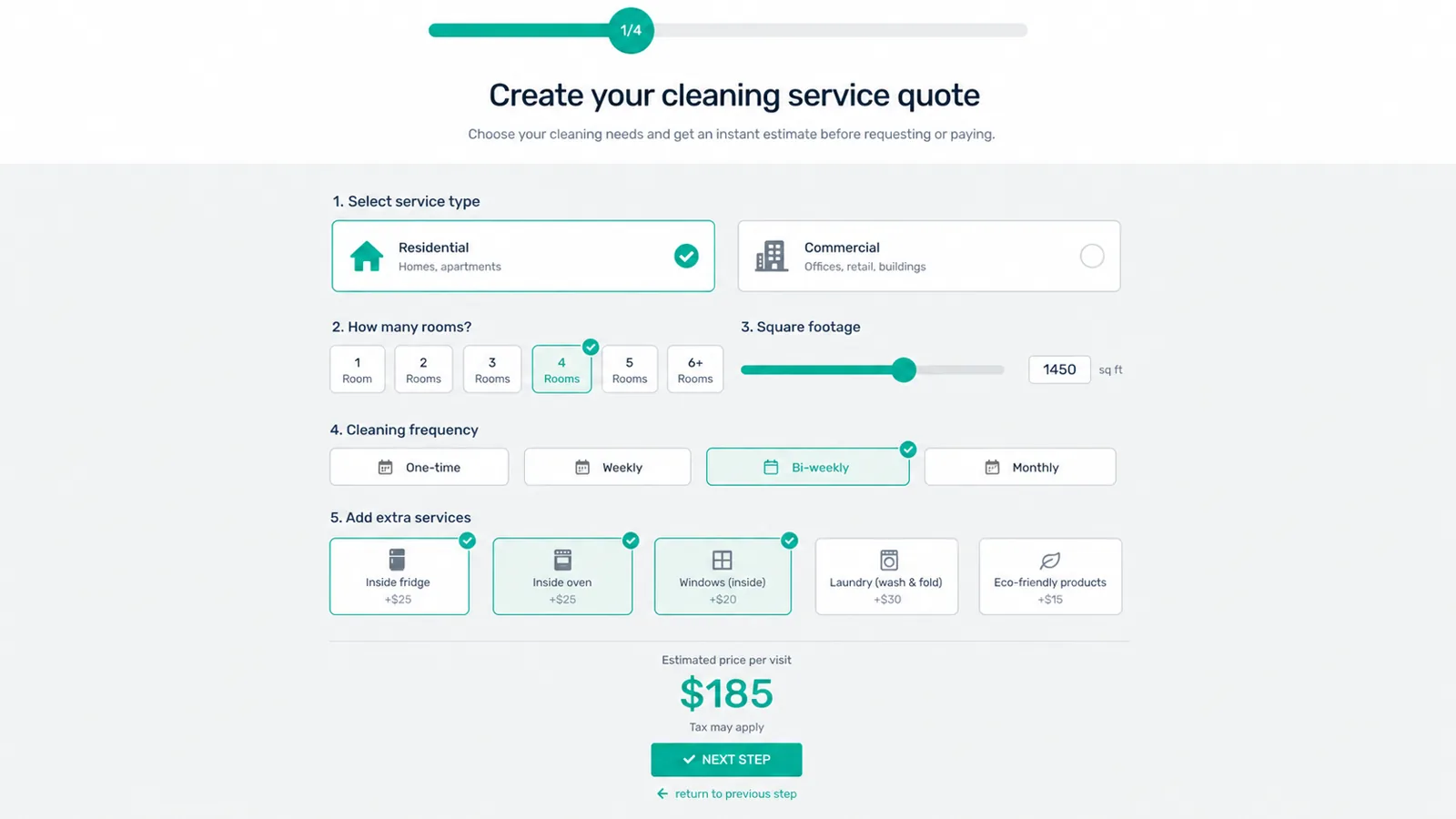
Cleaning service quote calculator form with rooms, square footage, frequency and extras

Cleaning quote: build and check a 70-unit example

Example monetary units, not market rates. An 80 m² standard clean with a 10-unit window option gives 70; a 10% frequency discount gives 63.

Method checked 5 October 2026: documentation and inspected E&P reference 10.6.4. This scenario was not run in WordPress. The formula explains arithmetic; it is not validated paste-ready builder syntax.

The illustration above is an existing marketing preview. It is not a new runtime capture of this example.

Inputs and assumptions

  • Area: required m² number, proposed range 0–1,000, decimals allowed.
  • Service type: standard or deep clean; this example prices only standard cleaning.
  • Windows: optional 10-unit item, eligible only for standard cleaning in this teaching scenario.
  • Frequency: one-off (0% discount) or regular (10%); this is a price rule, not a payment subscription.

Reproduce in your builder

  1. Create linked steps for property/service, options/frequency and summary in Steps manager. Add a required numeric area item and service choices; set your own bounds.
  2. For the window item, use Show it depending on conditions with service = standard. In the price calculation, make its contribution 10 only when eligible and selected, otherwise 0. Visibility alone is not proof that its price is removed.
  3. In the Price tab, enable Price calculation. Use Add a value and Add a condition to select your actual items; implement the base, area rate, minimum and then discount. Do not copy invented item IDs or price the same contribution twice.
  4. Preview the form and review the summary: area, service, eligible windows, frequency and total. Go back, deselect windows, change eligibility and reset; verify the total and validation before publishing.

Illustrative calculation

estimate = max(minimum, base + area × area_rate + eligible_options) × (1 − discount)

  • max(40, 20 + 80 × 0.50 + 10) × (1 − 0) = 70
  • The same selection with discount 0.10: 70 × 0.90 = 63
  • Minimum before discount: max(40, 20 + 0 × 0.50 + 0) × 0.90 = 36

Changes to verify

Selecting windows adds 10 only for the eligible standard service. Removing them gives 60, or 54 with the regular-service discount. Do not leave a hidden or deselected option contributing to the total; that builder behavior still needs testing.

Scope and limits

Minimum applies before discount in this example. Empty, negative and out-of-range area must be rejected by the configured form; those validations have not been tested in E&P. Deep-clean rates, rooms, supplies, tax, travel, booking, email and payment are excluded.

The button opens the general examples on this site, not this exact cleaning calculator. No dedicated, tested 70-unit template or downloadable export is supplied.

Common problems this page solves

  • Cleaning prices vary by property size, room count, frequency and special requests.
  • A generic contact form creates too much follow-up before a quote is useful.
  • Recurring services need clearer package choices and optional extras.

What the plugin helps you do

  • Define a base fee, area rate and minimum before discount.
  • Offer eligible window cleaning as an optional priced item.
  • Use a service condition and verify that excluded options contribute zero.
  • Review area, choices, frequency and the estimate in a summary.
  • Test the quote first; email, booking and payment need separate configuration and validation.

Proof

From documented builder controls to a clear cleaning quote

The setup below uses documented numeric items, price calculations and conditions. Its arithmetic is checked; this exact scenario has not been executed in WordPress.

WordPress
visual form builder
504
archived reviews
4.9/5
archived CodeCanyon rating
14-day
money-back guarantee
Use-case blueprint

How this quote flow should work

Collect the project details, apply your pricing rules and let visitors review their estimate before submitting.

Capture the buyer intent

Cleaning prices vary by property size, room count, frequency and special requests.

Price the variables that matter

Define a base fee, area rate and minimum before discount.

Turn the quote into action

Test the quote first; email, booking and payment need separate configuration and validation.

Frequently asked questions

How does the minimum interact with a frequency discount?

In this teaching example, apply the minimum first and the discount second. A 40-unit minimum with 10% discount can therefore give 36. Change the convention only when your own pricing rules require it.

Is a regular-service discount a payment subscription?

No. It changes the example estimate only. Recurring billing and its gateway settings are separate and have not been tested here.

Can I try or download this exact cleaning template?

No tested dedicated resource is supplied here. The button opens general examples; use the configuration steps to reproduce and validate your own form. No importable export is offered.

Ready to turn quote requests into paid projects?

Use Pro when you want payments, advanced logic, PDFs and premium booking workflows.

Continue with setup or payment

The calculation tutorial uses a different illustrated cleaning form; it does not validate the 70-unit scenario above. Read the Stripe guide only if your quote needs a payment step, and test that integration separately.