Loading...

Your privacy choices

Google Analytics 4 measures site visits and Google Ads measures advertising clicks and checkout completions, only for the purposes you accept. Neither is required to buy. Necessary checkout services remain available.

Your privacy choices

Google Analytics 4 measures site visits and Google Ads measures advertising clicks and checkout completions, only for the purposes you accept. Neither is required to buy. Necessary checkout services remain available.

These optional Google services may set audience or advertising cookies after your acceptance. Analytics and advertising are separate choices. Acceptance and refusal are remembered in this browser for a fixed 180 days, without extending the period when read. You can withdraw or change your choices at any time using Privacy choices in the footer. Withdrawal removes optional first-party Google cookies and reloads the page if Google has already loaded (using session storage in this tab if persistent storage refuses the withdrawal; a blank page opens only if both stores cannot safely record the withdrawal and a stale approval remains). Checkout, external demos, videos, support and newsletter services have their own privacy information.

Complete Documentation

Documentation

Everything you need to know about WP Cost Estimation

Global Settings

Section 9•5 min read

Configure plugin-wide settings: currency, date formats, API keys and more.

Master Your Global Settings

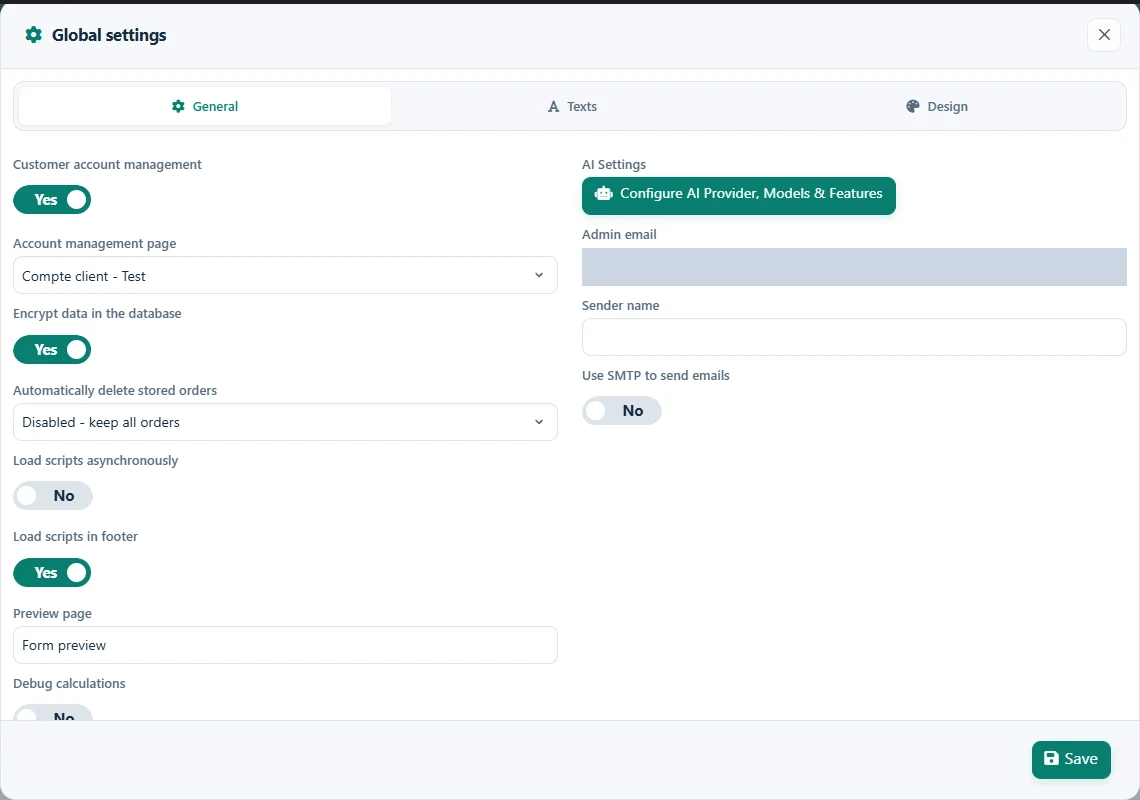
The Global Settings panel provides configuration options that apply to all forms across your site. These settings affect the overall behavior of the plugin and establish default values that can be overridden at the individual form level.

General Settings

Configure the core functionality and behavior of the plugin across your entire site.

  • •
    Default Currency:

    Set the default currency to be used across all forms. This can be overridden in individual form settings.

  • •
    Default Date Format:

    Choose the default date format for all forms. Individual forms can use their own date format if needed.

  • •
    Default Price Format:

    Configure how prices are displayed by default, including decimal and thousand separators.

Email Configuration

Set up global email settings that will apply to all forms unless overridden.

  • •
    SMTP Configuration:

    Configure SMTP settings to ensure reliable email delivery for all forms. Enter your SMTP server details, port, username, and password.

  • •
    Default Sender Email:

    Set the default email address that will appear as the sender for all form notifications.

  • •
    Default Sender Name:

    Set the default name that will appear as the sender for all form notifications.

Customer Account Management

Configure how customer accounts are managed across your site.

  • •
    Enable Customer Accounts:

    When enabled, customers can create accounts to view their order history and manage their information. This is required for GDPR compliance features.

  • •
    Customer Account Page:

    Select the page where customers can access their account information. The plugin will automatically add the necessary shortcode to this page.

  • •
    Account Page Colors:

    Customize the colors of the customer account page to match your website's design.

GDPR Compliance

Configure global settings to help ensure GDPR compliance across all forms.

  • •
    Enable GDPR Compliance:

    When enabled, additional GDPR compliance features will be available in all forms.

  • •
    Default Privacy Policy Text:

    Set the default text for privacy policy links that will appear in forms. This can be overridden in individual form settings.

  • •
    Data Retention Period:

    Set how long customer data should be retained before automatic deletion.

Database Management

Manage database settings and perform maintenance operations.

  • •
    Database Cleanup:

    Configure automatic cleanup of old data to maintain optimal database performance.

  • •
    Export/Import Settings:

    Export your global settings to back them up or import settings from another installation.

  • •
    Reset Plugin:

    Reset the plugin to its default settings. Use with caution as this will remove all forms and settings.

Integration Settings

Configure global integration settings for third-party services.

  • •
    Google Maps API Key:

    Enter your Google Maps API key to enable distance calculations and map components across all forms.

  • •
    reCAPTCHA Settings:

    Configure Google reCAPTCHA to protect all your forms from spam submissions.

  • •
    Mailchimp Integration:

    Enter your Mailchimp API key to enable integration with Mailchimp across all forms.

  • •
    Zapier Integration:

    Configure Zapier integration settings to connect your forms with thousands of apps and services.

Default Styling

Set default styling options that will apply to all forms unless overridden.

Default Color Scheme

Set the default colors for buttons, progress bars, and other elements across all forms.

Default Font

Choose the default font family and size for all forms.

Button Style

Configure the default appearance of buttons in all forms.

Input Field Style

Set the default style for input fields, including borders, padding, and focus effects.

Pro Tip: Global settings provide a foundation for all your forms, but remember that most of these settings can be overridden at the individual form level for maximum flexibility.

Keep moving

Useful next steps from documentation