Loading...

Your privacy choices

Google Analytics 4 measures site visits and Google Ads measures advertising clicks and checkout completions, only for the purposes you accept. Neither is required to buy. Necessary checkout services remain available.

Your privacy choices

Google Analytics 4 measures site visits and Google Ads measures advertising clicks and checkout completions, only for the purposes you accept. Neither is required to buy. Necessary checkout services remain available.

These optional Google services may set audience or advertising cookies after your acceptance. Analytics and advertising are separate choices. Acceptance and refusal are remembered in this browser for a fixed 180 days, without extending the period when read. You can withdraw or change your choices at any time using Privacy choices in the footer. Withdrawal removes optional first-party Google cookies and reloads the page if Google has already loaded (using session storage in this tab if persistent storage refuses the withdrawal; a blank page opens only if both stores cannot safely record the withdrawal and a stale approval remains). Checkout, external demos, videos, support and newsletter services have their own privacy information.

Complete Documentation

Documentation

Everything you need to know about WP Cost Estimation

Manage Your Customers

Section 12•5 min read

Access customer data, order history and contact information.

Guide to Customer Management in WP Cost Estimation & Payment Forms Plugin

Learn how to efficiently manage customer accounts and information collected through your cost estimation forms.

Accessing Customer List

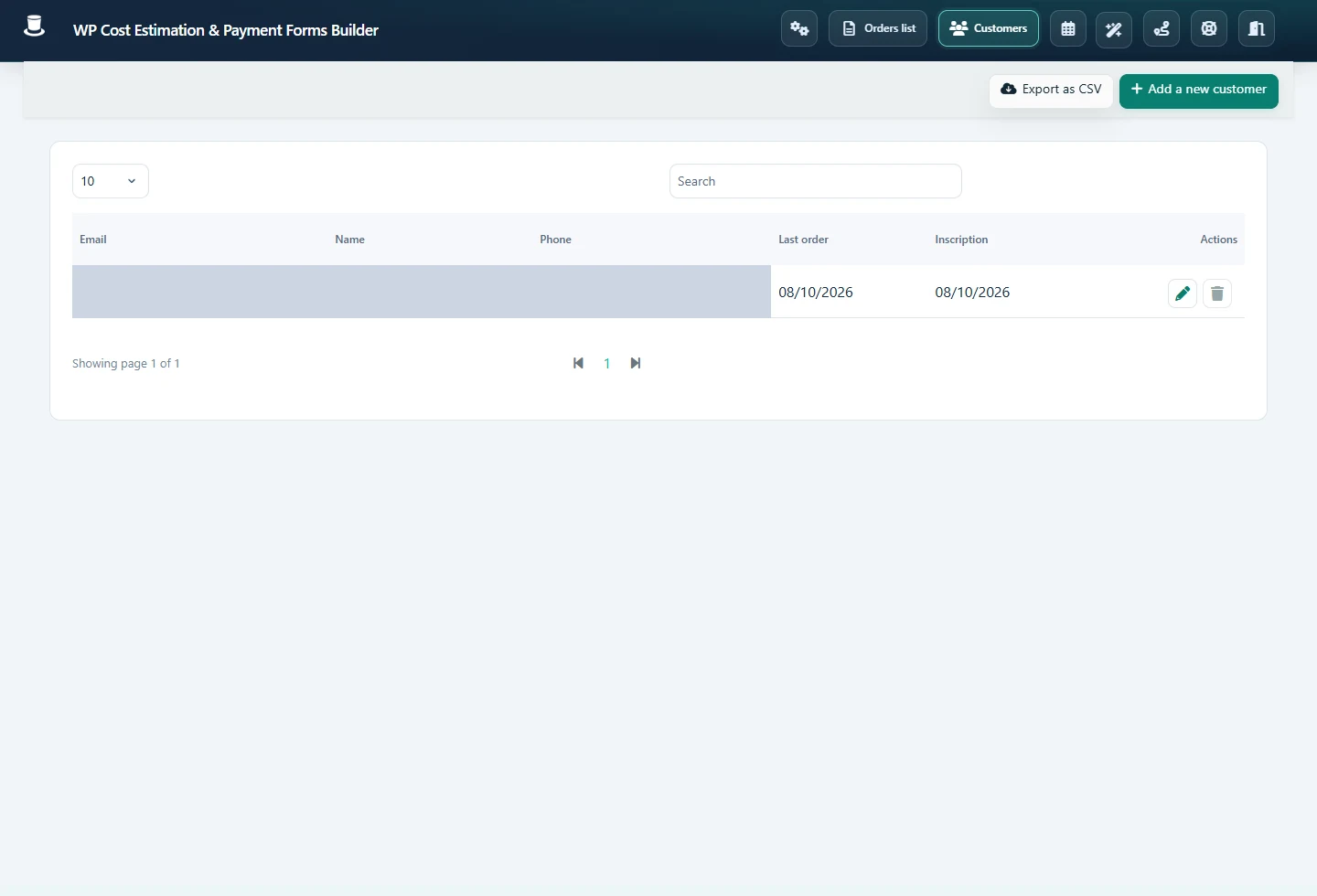
To access the list of customers, simply click the "Customers" button on the main toolbar of the plugin. This will open the customer list panel:

Customer List Panel

Customer List Overview

This table lists all customer accounts created automatically when orders were submitted through the forms. The system uses the email address to determine if a customer account already exists. To edit a customer's details, click the pencil icon corresponding to the customer's row.

Email Identification

The system uses email addresses as unique identifiers for customer accounts. When a new order is submitted, the system checks if the email already exists in the database.

Quick Edit

Each customer entry has an edit button that allows you to quickly access and modify their information. This is useful for updating contact details or correcting errors.

Customer Details Panel

The customer panel enables you to view and modify all the customer's information. It also displays all orders placed by the customer using any E&P form.

Customer Details View

Customer Information Management

Editable Information

The customer details panel allows you to edit various pieces of information about your customers:

Contact Information
  • • Name and surname
  • • Email address
  • • Phone number
  • • Company name
Address Information
  • • Street address
  • • City
  • • State/Province
  • • Postal code
  • • Country
Customer Orders

The customer details panel also shows all orders placed by the customer across all forms. This gives you a complete view of the customer's history with your business.

Order History

View a complete list of all orders submitted by the customer, including order dates, statuses, and total amounts. You can click on any order to view its details.

GDPR Compliance

The customer management system is designed with GDPR compliance in mind, allowing customers to access and manage their own data.

When GDPR features are enabled in the global settings, customers can:

  • •Access their personal data through a secure customer portal
  • •Update their personal information
  • •View their order history
  • •Request deletion of their data (right to be forgotten)
Customer Account Access

To enable customer account access, make sure the "Customer account management" option is enabled in the Global Settings panel. This will allow customers to log in and manage their information.

Customer Data Management

  • •Exporting Customer Data: You can export customer data for backup purposes or for use in other systems. This is useful for creating mailing lists or for data analysis.
  • •Deleting Customer Data: You can delete customer accounts when they are no longer needed. This is important for compliance with data protection regulations.
  • •Merging Customer Accounts: If a customer has multiple accounts (e.g., due to using different email addresses), you can merge these accounts to consolidate their order history.
  • •Data Retention: Configure data retention policies in the Global Settings to automatically delete customer data after a specified period, in compliance with data protection regulations.

Customer Management Best Practices

  • •Regularly review and update customer information to ensure it remains accurate and up-to-date.
  • •Use the customer data to personalize communication and improve customer service.
  • •Implement proper security measures to protect customer data, such as strong passwords and limited access to customer information.
  • •Regularly back up customer data to prevent loss in case of system failures.
  • •Be transparent with customers about how their data is used and stored, in compliance with privacy regulations.

Pro Tip: Use the customer management system not just for administrative purposes, but as a tool to build better relationships with your customers. Understanding their order history can help you provide more personalized service and targeted offers.

Keep moving

Useful next steps from documentation