Loading...

Your privacy choices

Google Analytics 4 measures site visits and Google Ads measures advertising clicks and checkout completions, only for the purposes you accept. Neither is required to buy. Necessary checkout services remain available.

Your privacy choices

Google Analytics 4 measures site visits and Google Ads measures advertising clicks and checkout completions, only for the purposes you accept. Neither is required to buy. Necessary checkout services remain available.

These optional Google services may set audience or advertising cookies after your acceptance. Analytics and advertising are separate choices. Acceptance and refusal are remembered in this browser for a fixed 180 days, without extending the period when read. You can withdraw or change your choices at any time using Privacy choices in the footer. Withdrawal removes optional first-party Google cookies and reloads the page if Google has already loaded (using session storage in this tab if persistent storage refuses the withdrawal; a blank page opens only if both stores cannot safely record the withdrawal and a stale approval remains). Checkout, external demos, videos, support and newsletter services have their own privacy information.

Complete Documentation

Documentation

Everything you need to know about WP Cost Estimation

Use with WooCommerce

Section 17•5 min read

Integrate your estimation forms with WooCommerce products and cart.

Available in Pro and Agency.

Seamless WooCommerce Integration for Custom Form Product Assignments

Learn how to integrate your cost estimation forms with WooCommerce to create a seamless shopping experience for your customers.

Integration with WooCommerce

This plugin seamlessly integrates with WooCommerce, enabling you to link form components to WooCommerce products and automatically populate the WooCommerce cart upon form submission.

Key Benefits
  • Link form components directly to WooCommerce products
  • Automatically add selected items to the WooCommerce cart
  • Customize pricing based on form selections
  • Track form submissions through WooCommerce orders
  • Include form summaries in WooCommerce order details
Requirements

WooCommerce must be installed and activated on your WordPress site for these integration features to be available.

Enabling WooCommerce Integration

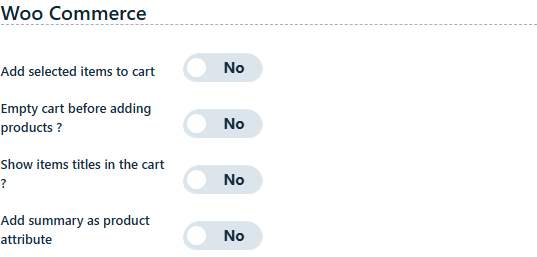
Begin by activating the "Add selected items to cart" feature found in the "Final Step" tab within the form settings:

WooCommerce Integration Settings

Note: These settings become available only when WooCommerce is active on your WordPress site.

Linking Components to WooCommerce Products

Next, within the component settings panel (applicable to priced items such as checkboxes, images, buttons, sliders, etc.), select the "Woo product" option to link a WooCommerce product.

Product Selection Interface
WooCommerce Product Selection
Product Search

Type to search and utilize the autocomplete feature to select the desired WooCommerce product. This makes it easy to find and link specific products from your WooCommerce catalog.

Price Customization

You can adjust the price or set up a price calculation as needed. The linked product will be added to the WooCommerce cart reflecting the component's pricing, not the original product price.

How the Integration Works

Cart Population

Only WooCommerce products will be added to the cart. All other form data is captured and stored by the plugin upon submission. The submission's reference number is attached as an attribute to the WooCommerce product within the order for easy correlation.

Form Summary

Additionally, you have the option to include a complete summary of the form as a product attribute in the WooCommerce order for comprehensive record-keeping. This ensures that all form selections and calculations are preserved in the WooCommerce order details.

Pro Tip: For complex product configurations, consider using a multi-step form where each step focuses on a specific aspect of the product or service. This creates a cleaner user experience and makes it easier to manage the WooCommerce product assignments.

Keep moving

Useful next steps from documentation